String to Image Node
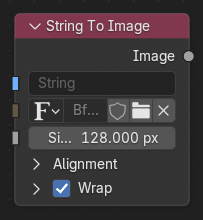
The String to Image node renders text from a string input and outputs it as an image. This can be used to display dynamic text in the compositor, such as frame numbers, metadata, labels, or values generated by other nodes.
Inputs
- String
The text to render.
- Font
The font used to render the text.
- Size
The size of the text in pixels.
Alignment
- Horizontal Alignment
Controls horizontal alignment of text on each line.
- Left:
Aligns the text to the left.
- Center:
Aligns the text to the center.
- Right:
Aligns the text to the right.
- Justify:
Aligns the text to the left and right.
- Flush:
Aligns the text to the left and right with equal character spacing.
- Vertical Alignment
Controls vertical alignment of the block of text.
- Top:
Aligns the text to the top.
- Top Baseline:
Aligns the text to the top baseline.
- Middle:
Aligns the text to the middle.
- Bottom Baseline:
Aligns the text to the bottom baseline.
- Bottom:
Aligns the text to the bottom.
Wrap
- Width
The maximum width of each line. Words that exceed the width are moved to the next line, though individual words are not split.
Outputs
- Image
The rendered text as an image with transparency.